MCP-Serverless-Core is a minimal, production-ready starting point for hosting Model Context Protocol (MCP) tools on Azure Functions using the .NET isolated worker model.
The goal is simple: Expose MCP-compatible tools through a serverless endpoint that can scale to zero, while staying lightweight and extensible.
Why Serverless MCP?
Running MCP tools in a serverless environment provides:
- Zero idle cost (scale-to-zero)
- Automatic scaling
- Minimal infrastructure overhead
- Native integration with Azure monitoring (Application Insights)
This makes it ideal for AI agents, tool execution backends, and experimental workflows.
Tech Stack
- Azure Functions v4 (
dotnet-isolated) - .NET 10 (
net10.0) Microsoft.Azure.Functions.Worker.Extensions.Mcp- Application Insights
Architecture
The project follows a clean and minimal structure:
/Program.cs              -> Host bootstrap & DI
/Tools/FibonacciTool.cs  -> Sample MCP tool
/host.json               -> MCP + host configuration
/local.settings.json     -> Local environment config
MCP tools are registered and exposed through the Azure Functions runtime, allowing external systems (like AI agents) to invoke them via a standardized interface.
Sample Tool: Fibonacci
A simple tool is included to demonstrate MCP integration.
Tool Name: FibonacciTool
Input: count
Output: Fibonacci sequence
Example:
count = 5
→ 0, 1, 1, 2, 3
This acts as a baseline for building more advanced tools.
Running Locally
Start storage emulator (optional):
docker compose up -d
Run the function app:
func start
Build:
dotnet build
Configuration
Create a local.settings.json:
{
  "IsEncrypted": false,
  "Values": {
    "AzureWebJobsStorage": "UseDevelopmentStorage=true",
    "FUNCTIONS_WORKER_RUNTIME": "dotnet-isolated"
  }
}
MCP Configuration
MCP behavior can be tuned inside:
host.json → extensions.mcp
This allows customization of:
- Tool exposure
- Metadata
- Execution behavior
Development Notes
- Keep secrets out of source control
- Use
local.settings.jsonfor local development - Extend the
/Toolsdirectory to add new MCP tools - Designed to plug directly into AI agent ecosystems
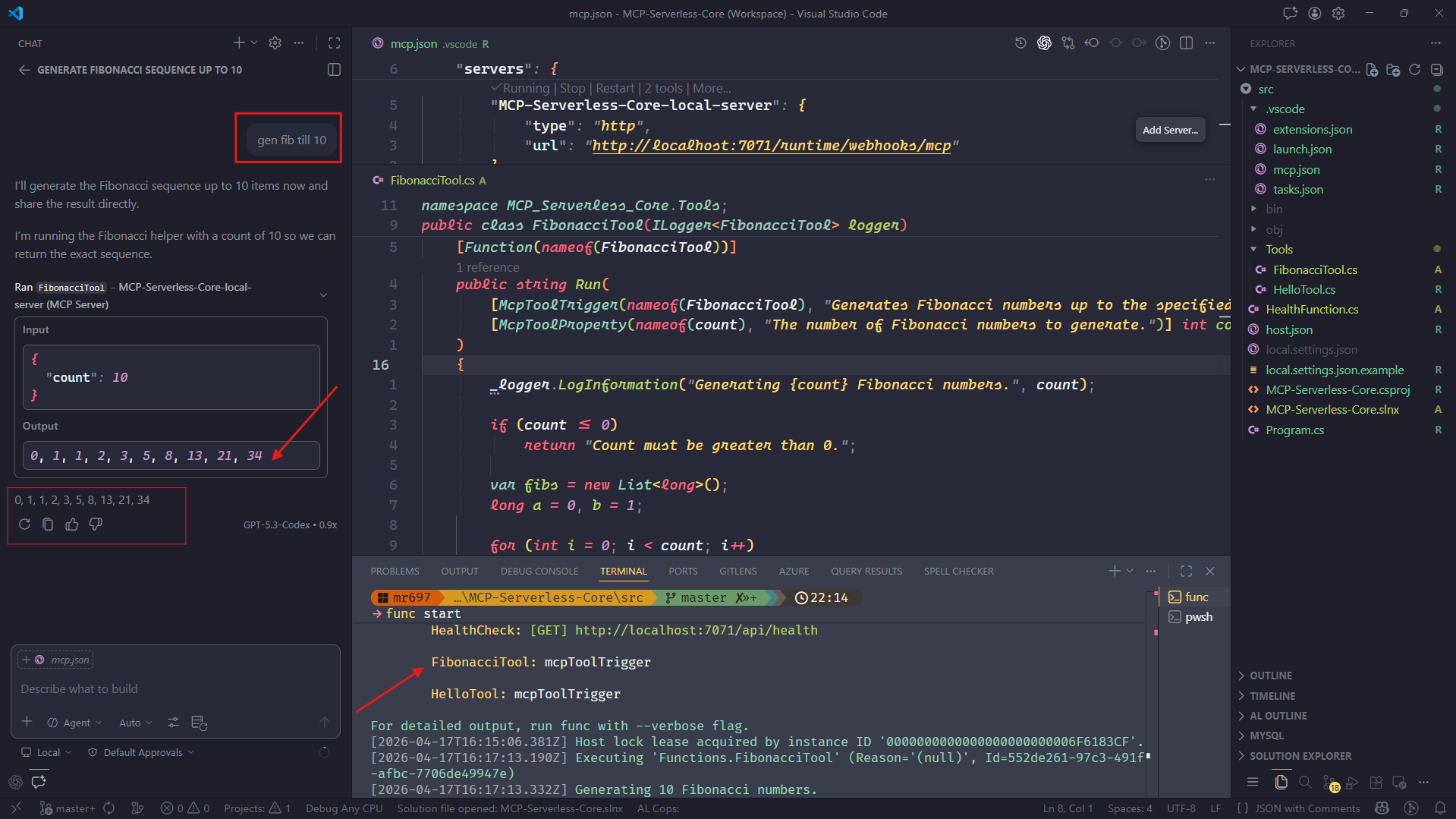
Screenshot
Add your VS Code running server screenshot here
Final Thoughts
This project is intentionally minimal but powerful.
It gives you:
- A working MCP server
- A serverless execution model
- A clean base to build custom tools
From here, you can evolve it into:
- AI agent tool backends
- Internal automation services
- Distributed tool execution systems
Source Code
Available on GitHub MCP-Serverless-Core (as always). Clone, extend, and build your own MCP-powered services.